GCNClient GUI
This is a basic GUI for configuring the globalCalcNet client program, written in C#. It’s known to work on Windows, and should be capable of operating properly on non-Windows platforms with minimal modification. You may also want to see the discussion thread for this program on Cemetech.
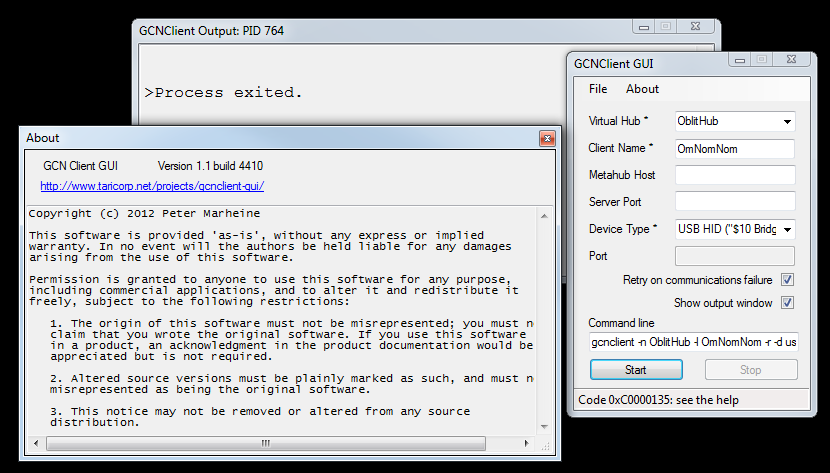
Download
Current version is 1.1. Installer and ZIP archive (program only) are available. If you’re interested in seeing how it does something or modifying it, you can also grab the source package.
If you are unable to run the program, ensure you have the .NET 3.5 or newer runtimes (or equivalent, for non-Windows systems) installed. It can be downloaded from Microsoft. For non-Windows systems, Mono should do the job.
Old versions
1.0: Binary package (for .NET 4.0 of newer, includes Windows binary for the client itself), or source package (Visual Studio 2010 project).
Troubleshooting
If it doesn’t work, ensure the gcnclient program itself works properly before complaining to me. You can get detailed output from the client program itself by checking the “Show output window” box. In most cases, failures are related to misconfigurations in libusb. There’s a little bit of discussion of the project over on Cemetech, which is a good place to ask for help (I hang out there as well).
When the client exits with 0xC0000135, the GUI says to “see the help”, which doesn’t exist (except this is it). This error is due to a libusb misconfiguration making the client unable to start, but shouldn’t occur anymore since version 1.1, since it now includes the requisite libusb dependencies.